Digital twin
A digital twin is Rhino's viewport mirroring the real robot's pose in real time. You move the arm (physically or via teach pendant), Rhino updates.
The wiring
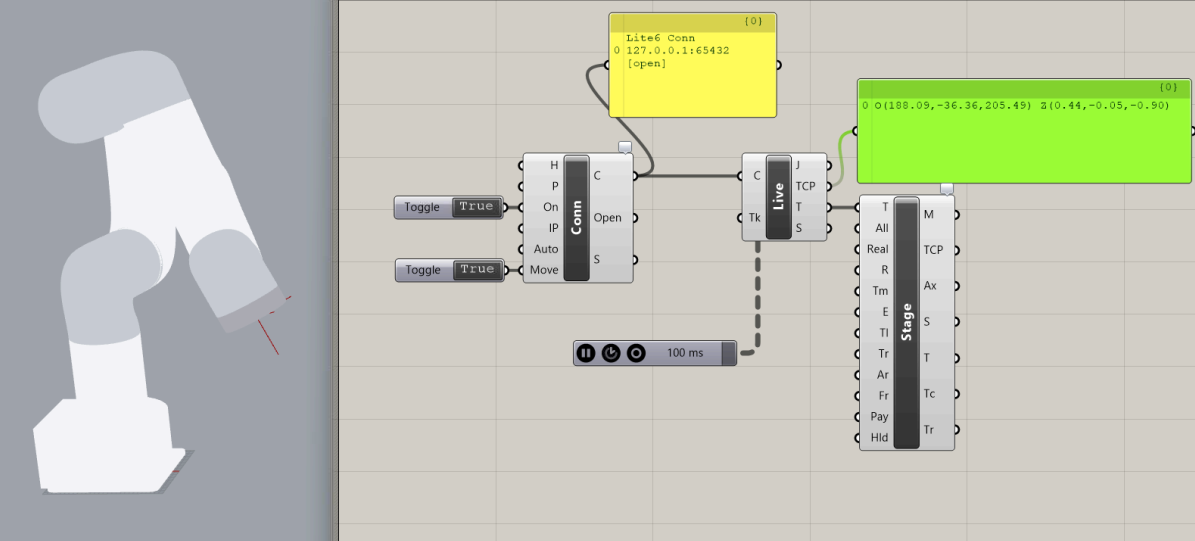
Connect streams the robot's live state through Live, refreshed by a timer, into Stage, which mirrors the real joints, TCP plane, and mesh in the viewport. That's the digital twin.
Step by step
- Open the canvas from step 3 with Connect already working.
- Drop a GH Timer (right-click canvas → Special → Timer). Set it to 200ms.
- Drop a Live State component. Wire:
- Connection → Connection
- Timer → Tick
- You should now see the Joints output updating, TCP Plane updating.
- Wire Live State's Target output into a fresh Lite6 Sim with Real Meshes on. The arm in Rhino now mirrors the real arm.
What you can do with it
- Plan motion from current pose. Use Live State's Joints as the Seed input on the next PTP/LIN, the IK starts from where the robot actually is, not zeros.
- See live IO state. Wire a Get IO component to the same Connection, read controller + tool digital input states.
- Teach by demonstration. Drag Mode (set Drag=true) puts the controller in manual / free-drive. Physically move the arm. The Rhino viewport tracks it. Combine with Record to capture a .traj file on the controller.
Polling rate trade-off: 100-250ms feels live. Below 50ms you'll
get a lot of bridge traffic and Rhino's solve overhead becomes noticeable. The
Test Bridge component's Latency reading is your tuning guide.
Sending commands live
Live Send pushes a single RobotTarget straight to the robot, no codegen step. Useful for prototyping individual moves before stringing them into a script:
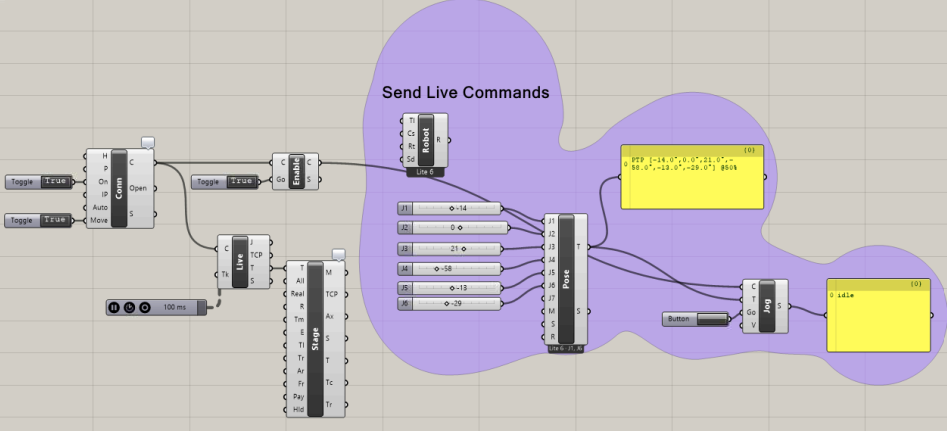
Enable the robot, wire up a target, and a one-click Button pushes it straight to the arm through Live, with no code generation step.
Set Send=true with a one-click Button (not a Toggle), the robot moves.
SAFETY: Live Send executes immediately. There's no preview.
Always test a new canvas with Bounds (workspace limits) wired upstream,
and keep your hand on the E-Stop. E-Stop is a software equivalent,
useful for canvas-driven watchdog logic but not a substitute for the physical button.
Next: generate offline scripts.