Stage, the control surface
Stage (Visualization subcategory) is the canvas-level hub
for working with a toolpath. Drop one, wire your target list into T,
and it renders the robot at the last target in the Rhino viewport. But there's
much more: double-click it for the Stage form.
Drop the Stage component on the canvas and double-click it to open the form:
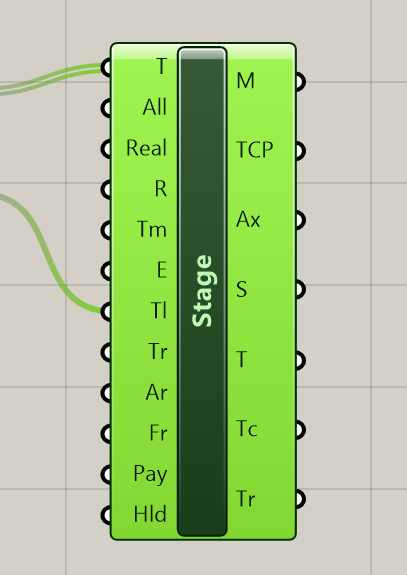
The form (double-click to open)
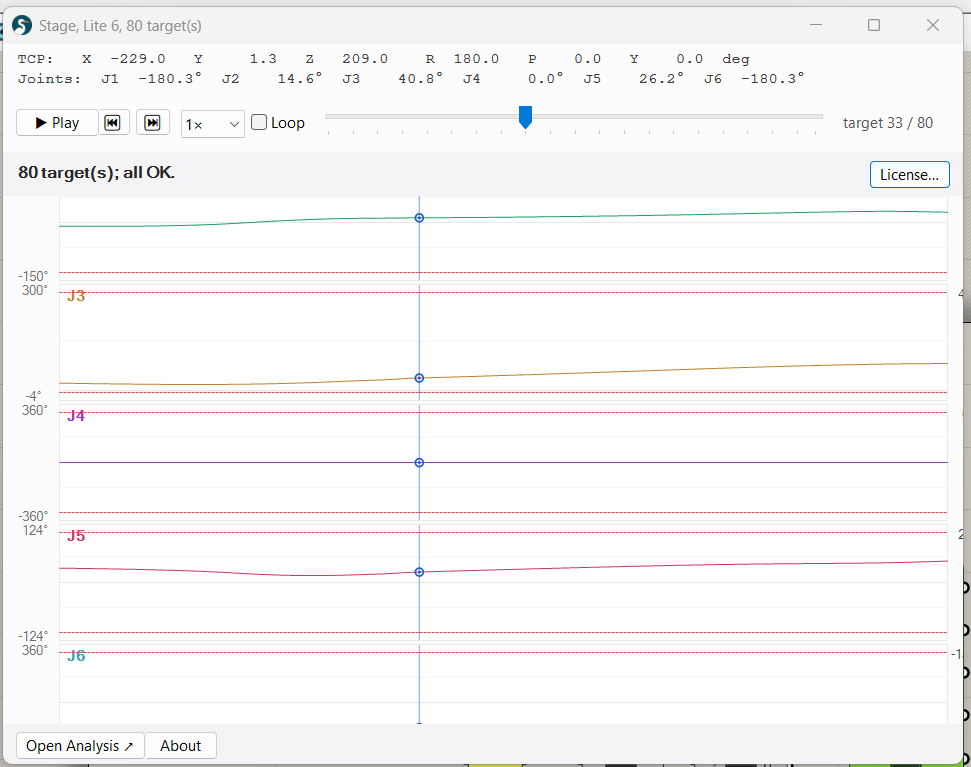
Timeline
- ▶ Play / ⏸ Pause, sweeps the slider through every target, animating the arm in the Rhino viewport. Auto-stops at the end.
- ⏮ / ⏭, skip to first / last target.
- Speed dropdown, 0.25× / 0.5× / 1× / 2× / 4× target-per-second. 1× is the default (50 ms per target = 20 fps). Use slower for inspection on dense paths; faster to skim long programs.
- Slider, drag to scrub manually. The Rhino 3D viewport repaints the arm at the picked target in real time. The vertical cursor on each joint plot follows the slider position.
Per-joint spark plots
Below the readout, one row per joint shows the joint's trajectory across the toolpath in degrees. Annotations:
- Dashed red lines, hardware joint limits for the wired robot model. If the trajectory ever crosses these, that target is unreachable on the real robot.
- Orange dot markers, warning targets (joint-limit overshoot caught by Stage's snapshot).
- Blue vertical cursor, the current slider / scrub position. Moves in lock-step with the timeline.
For richer analysis (axis flip detection, wrist / elbow / shoulder
singularity warnings), click Open Analysis ↗ at the footer
, launches the full Analysis form over the same data.
License button
Top-right of the header. Opens the license-activation panel: status (Free / Personal / Educational / Expired), paste-token textbox, Activate / Deactivate buttons, and links to buy or claim educational tier. See Generating code for how the free-tier export cap works vs. licensed output.
Keyboard shortcuts
| Key | Action |
|---|---|
| Space | Play / Pause |
| ← / → | Step one target backward / forward |
| Esc | Close the form |
Canvas-driven scrub (without the form)
You can also drive Stage's scrub from the canvas, wire a Number
Slider with range 0.0 .. 1.0000000 into Stage's
Time (Tm) input. The value maps to the nearest target index
(round(t × (N-1))). Useful for:
- Inspecting a long toolpath step-by-step without opening any form.
- Driving Grasshopper's animator (right-click slider → Animate…) to record a video of the toolpath, frame by frame.
- Wiring
Stage.Tc(Current Target output) into downstreamCode/G-Code/Analysisso a single slider drives both the 3D render AND the emitted command.
Priority when multiple scrub sources are active:
- Form open → form's slider wins (canvas Time temporarily ignored).
- Else: wired Time input.
- Else: Show All input toggled true → overlay all poses.
- Else: render last target only.
Opening the form from a canvas with a wired Time input initializes the form's slider at the wired position, no jarring jump. Closing the form returns control to the wired Time, or (if no Time is wired) keeps the form's last scrub position as the persistent render position.
Outputs at a glance
- Robot Meshes (M), link meshes at the current pose, for downstream geometry workflows.
- TCP, the tool plane (flange or TCP-offset). Wire into your tool geometry.
- TCP Axes (Ax), three 50 mm line segments along the TCP plane's X/Y/Z. Quick visual orientation indicator in the viewport.
- Status (S), short text: 'ok' or 'Jx out of range'.
- Targets (T), passthrough of the input target list. Fork into
Analysiswithout re-merging from the source. - Current Target (Tc), the single target Stage is currently rendering. Pair with the Time input for slider-driven workflows.